How to redeem Webivus Pro free for 30 days — beta members guide
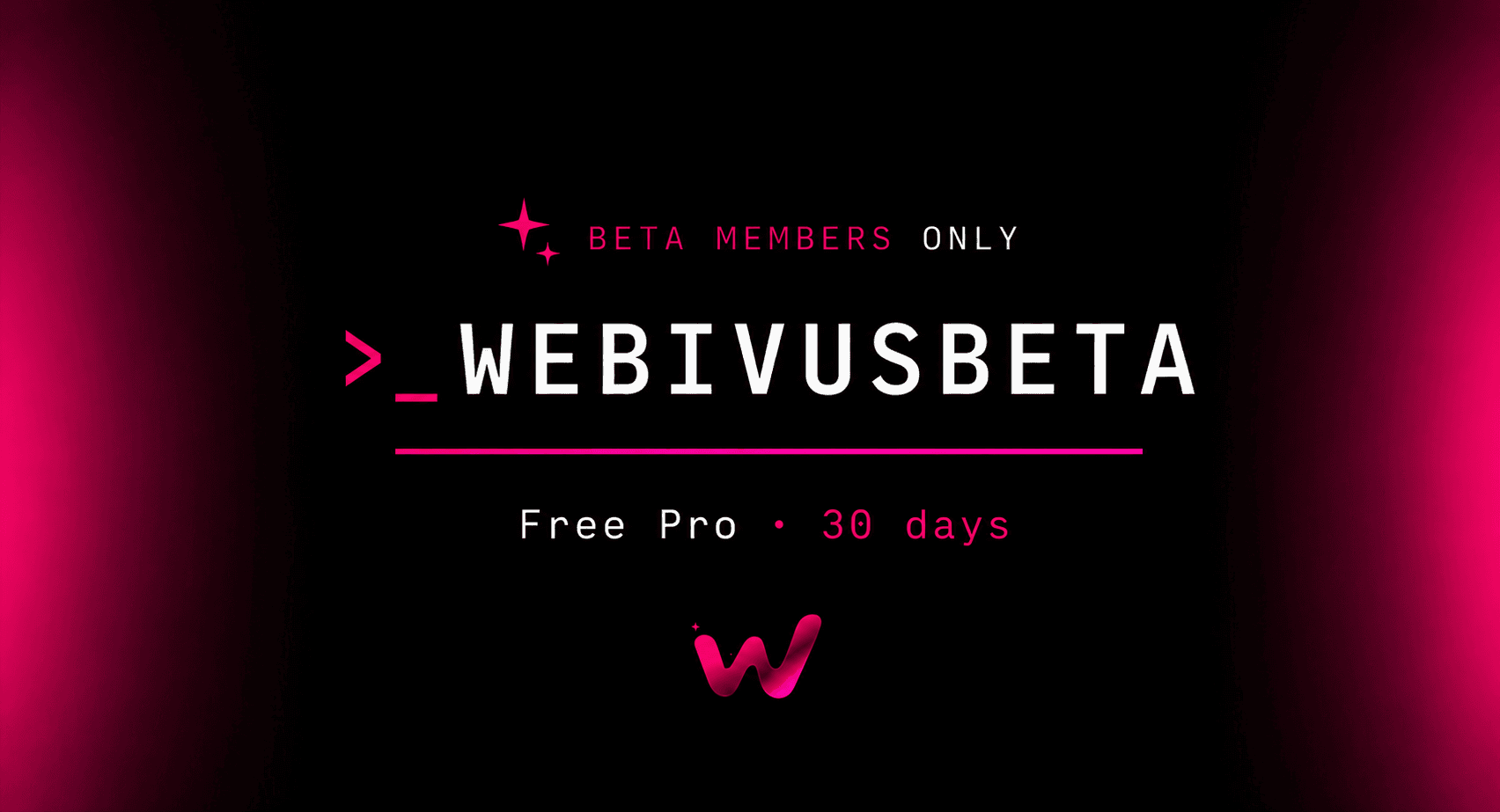
A step-by-step walkthrough for claiming your free month of Webivus Pro with code `WEBIVUSBETA`. Two paths, every click covered.
On this page
- What you're unlocking for 30 days
- Before you start
- Step 1: Open the pricing page
- Step 2: Confirm billing is set to Monthly, then pick Pro
- Step 3: Create your account
- Step 4: Land on the secure checkout page
- Step 5: Paste your coupon code
- Step 6: Add your card details
- Step 7: Subscribe
- Step 8: Finish onboarding and connect your first WordPress site
- Three ways in (pick one)
- Once you're in the upgrade flow
- How to confirm Pro is active
- What happens after the 30 days
- Troubleshooting
- Come hang out in Discord
A quick note from me before we get into it.
When we started building Webivus, the idea was simple. Anyone running a WordPress site should be able to talk to it the way they'd talk to a developer. Say what you want done, and it gets done. No plugin spelunking. No fourteen tabs to find one setting.
We're now in beta, and if you're reading this, you're one of the early people we built it for. To say thanks for showing up early, we're putting Webivus Pro in your hands for 30 days, completely free. No catch, no surprise charge. The full product, your turn to use it.
Your code:
WEBIVUSBETAThis guide walks you through redeeming it click by click. Pick the path that matches where you are right now.
What you're unlocking for 30 days
Pro is our plan for growing sites. Your free month includes:
- 250 credits per month.
- Up to 5 connected WordPress sites, expandable to 15 at $8/site/month if you need it later
- All three AI agents — Admin, SEO, and Q&A
- 30 messages per minute rate limit
- 20 AI web research lookups per day
- Unlimited image analysis and unlimited AI SEO blog posts
- 90 days of chat history
- 15% credit optimization — Pro requests use fewer credits than lower plans
- Immediate beta access to everything we ship next
Normal price: $59/month. With WEBIVUSBETA: $0 for month 1, then $59/month after that. Cancel anytime.
Before you start
You'll need:
- An email address, or a Google account if you'd rather sign in with Google
- A credit or debit card, Google pay, Apple pay, and others — required for the renewal in 30 days, but you won't be charged today
- About two minutes
⚠️ One detail that matters. WEBIVUSBETA is valid on Pro Monthly only. It won't apply to Pro Yearly or any other plan. Step 2 below shows you exactly where to confirm this — please don't skip it.That's everything. Let's go.
🟣 Path A — I don't have a Webivus account yet
Choose this path if you're brand new to Webivus and haven't signed up.
Step 1: Open the pricing page
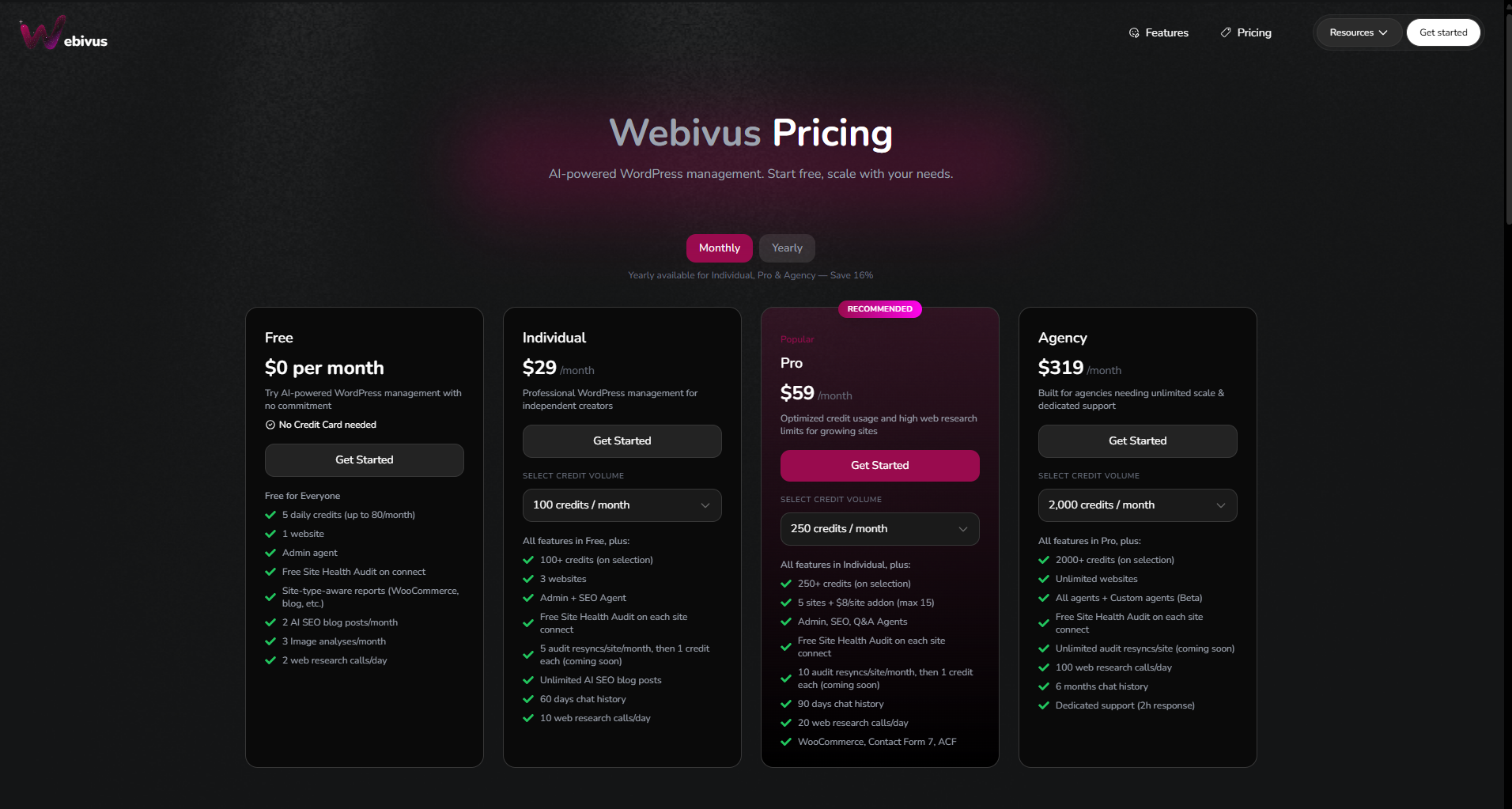
Go to webivus.com/pricing.
You'll see four plan cards — Free, Individual, Pro, and Agency.
Step 2: Confirm billing is set to Monthly, then pick Pro
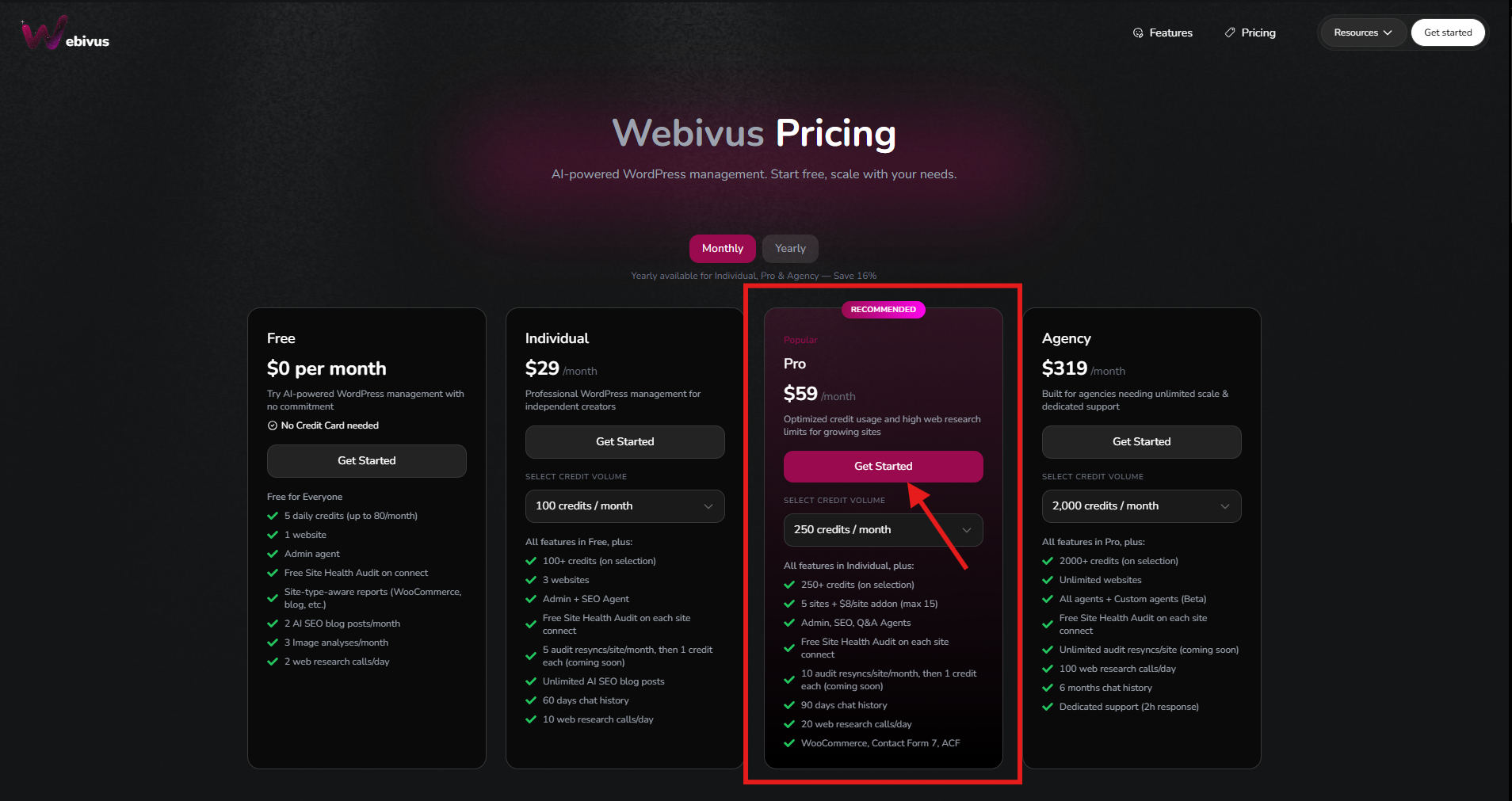
At the top of the pricing page, you'll see a Monthly / Yearly toggle.
Make sure it's set to Monthly. WEBIVUSBETA doesn't work on yearly plans, so this one switch is the difference between a successful redemption and a frustrating one.
Once Monthly is selected, find the Pro card (it's marked Popular) and click Get started.
Pro Monthly starts at $59/month for the 250-credit tier. You don't need to change anything from the default — the coupon is built for it.
Step 3: Create your account
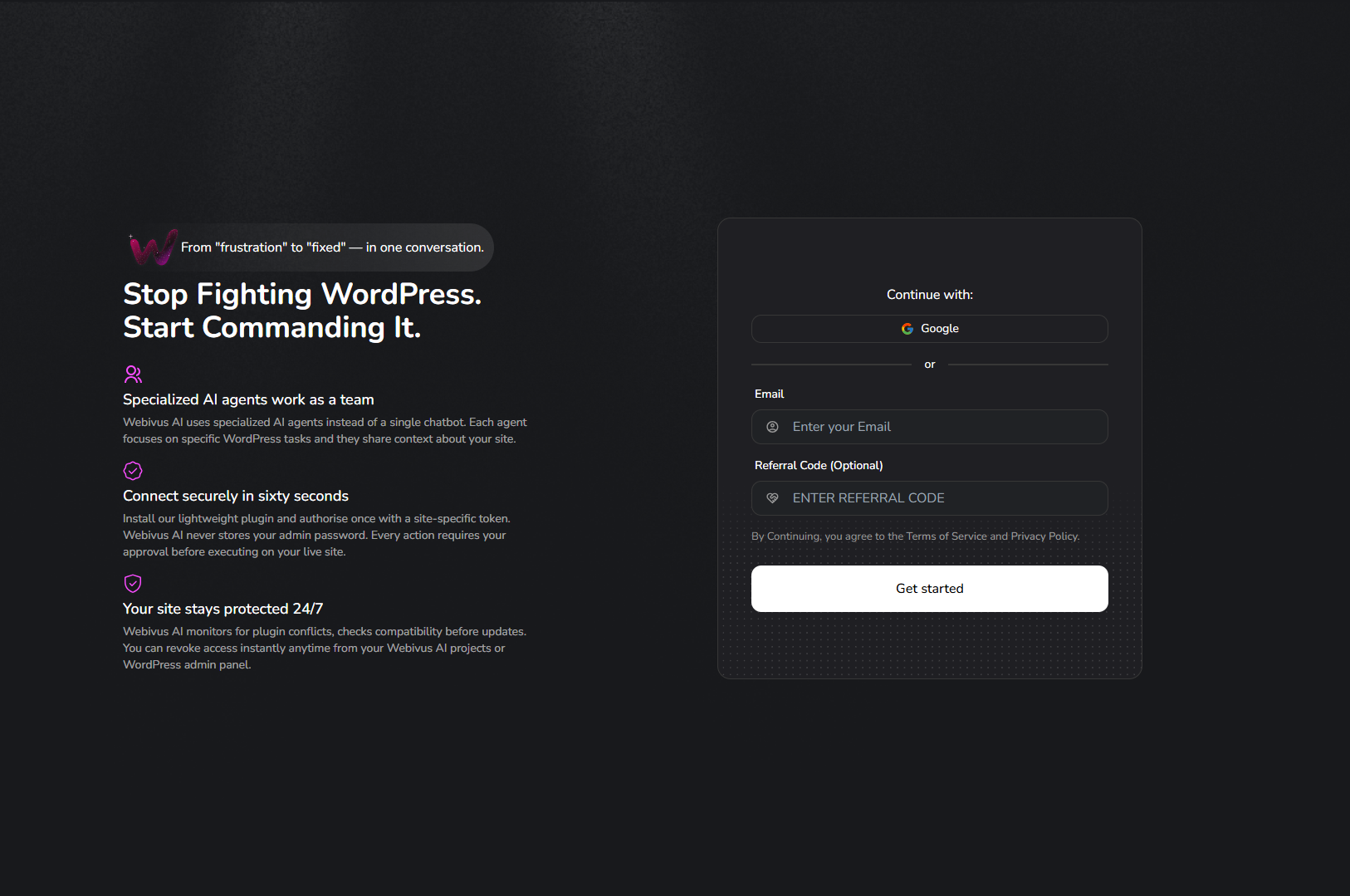
You'll land on the sign-up page with two options:
- Continue with Google — fastest, one click
- Continue with email — enter your email, you'll receive a 6-digit OTP code, paste it back to verify
- Referral Code (optional) - Ignore this referral code box.
Step 4: Land on the secure checkout page
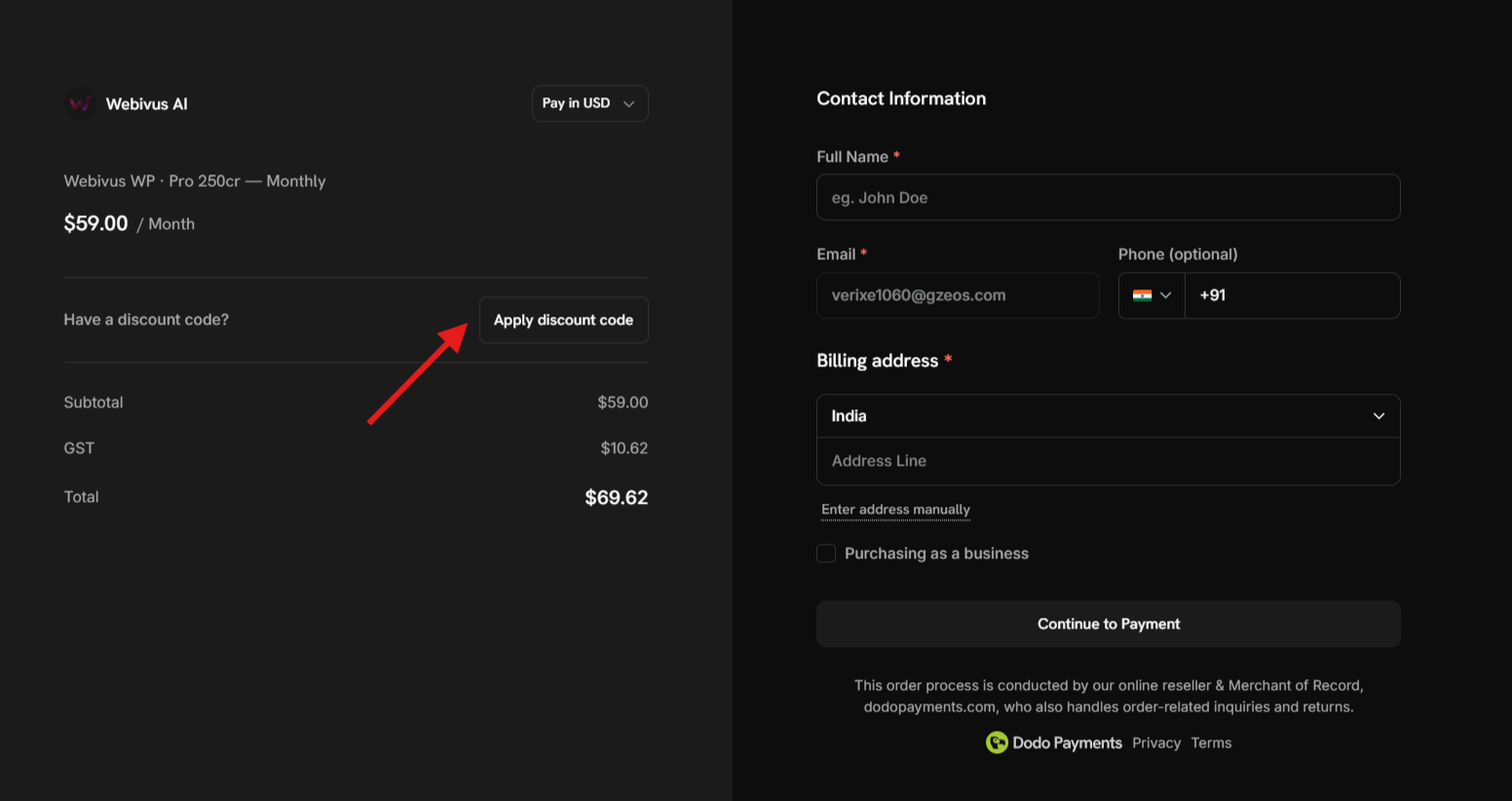
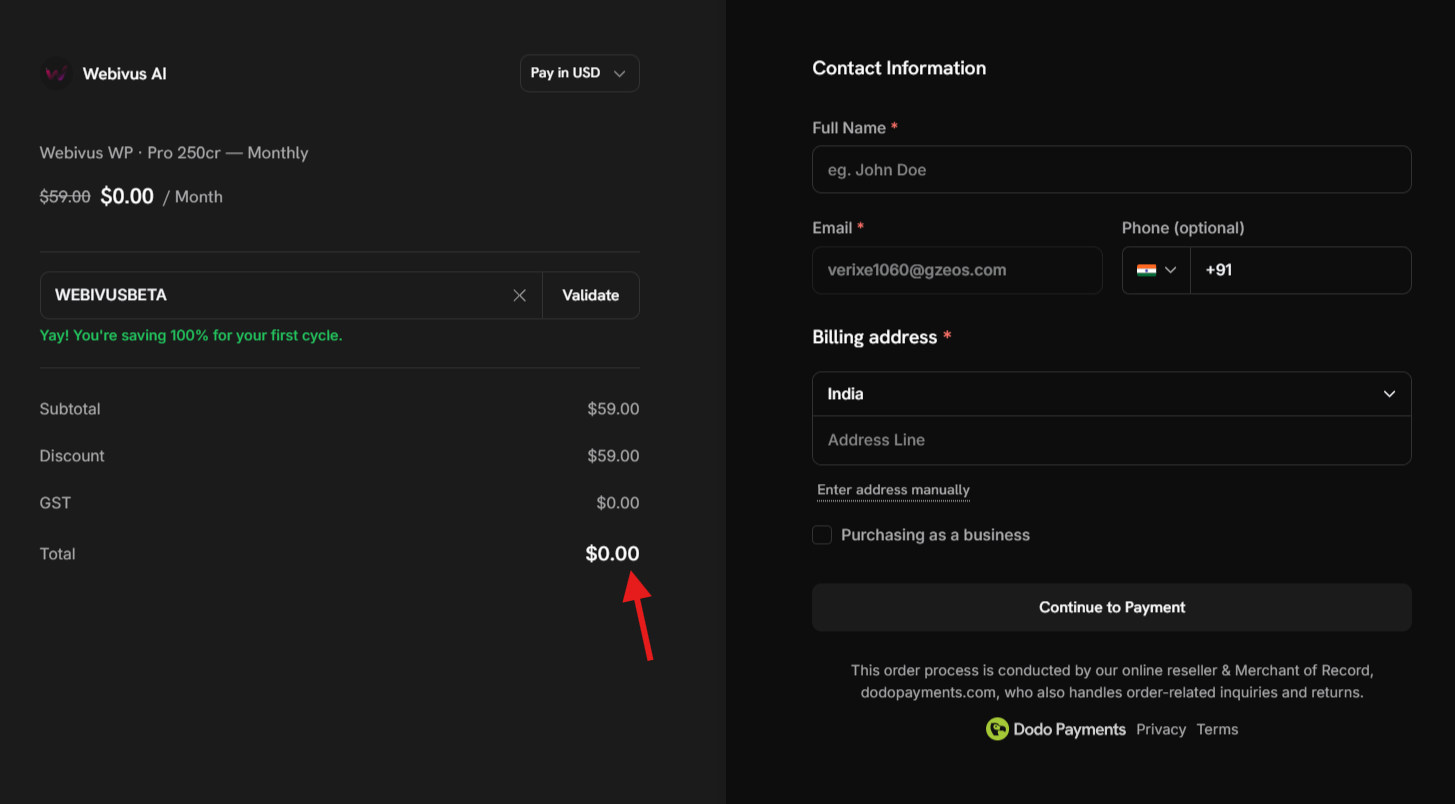
After sign-up, Webivus forwards you to our payment partner's secure checkout. You'll see your selected plan (Pro — $59.00), your email pre-filled, the card fields, and — the one we care about — a "Have a coupon?" link.
Step 5: Paste your coupon code
- Click "Have a coupon?" to expand the field
- Type or paste:
WEBIVUSBETA - Click Apply
The total updates instantly. You should now see:
- Subtotal: $59.00
- Discount (WEBIVUSBETA): −$59.00
- Total today: $0.00
- Fill your details after applying the coupon code and click on continue on payment
✅ Quick check. If the total still shows $59.00, the code didn't apply. Two things to check: spelling (it's WEBIVUSBETA, all caps, no spaces) and that Monthly was selected back on the pricing page. If those both look right and it's still stuck, ping us in Discord (link at the bottom of this post) and we'll fix it for you on our end.
Step 6: Add your card details
Today's charge is $0.00, but the checkout still asks for a card. That's for your renewal in 30 days. Nothing is charged today.
Fill in your card details and billing info.
Step 7: Subscribe
Click Subscribe (or Pay $0.00). You'll be redirected back to Webivus, fully signed in, on Pro.
Step 8: Finish onboarding and connect your first WordPress site
Webivus takes you straight into a short onboarding flow. You'll be asked:
- What's your role? Founder, marketer, developer, agency owner — pick the closest match.
- How did you find us? Helps us understand what's working. Feel free to be honest.
- Connect your first WordPress site. You'll install the Webivus plugin and authorize the connection. The screen walks you through it — no copy-pasting credentials, no FTP.
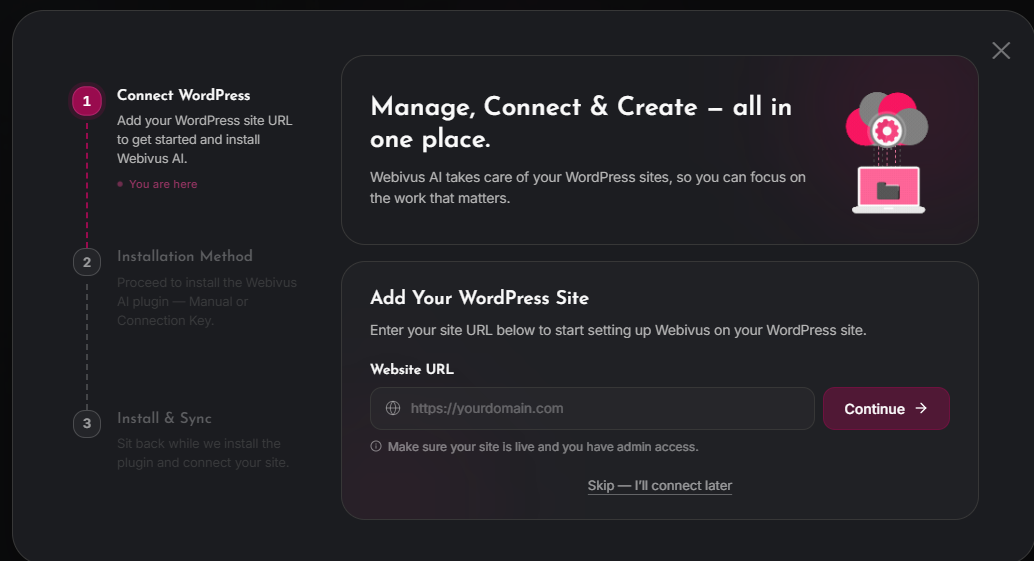
Once your site is connected, you're dropped into the agent chat. Try something simple to warm up — "Give me a health audit of my site" or "List my installed plugins" — and watch what Webivus can do. 🎉
🟣 Path B — I already have a Webivus account
Choose this path if you've signed up before, even just on the Free plan.
There are three different ways to get to the upgrade flow — pick whichever is closest to where you are right now. They all lead to the same checkout.
Three ways in (pick one)
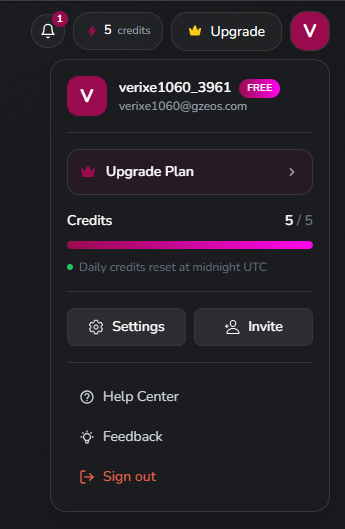
1. From the Upgrade button. Sign in at webivus.com, click your profile icon in the top-right corner, then click Upgrade Plan.
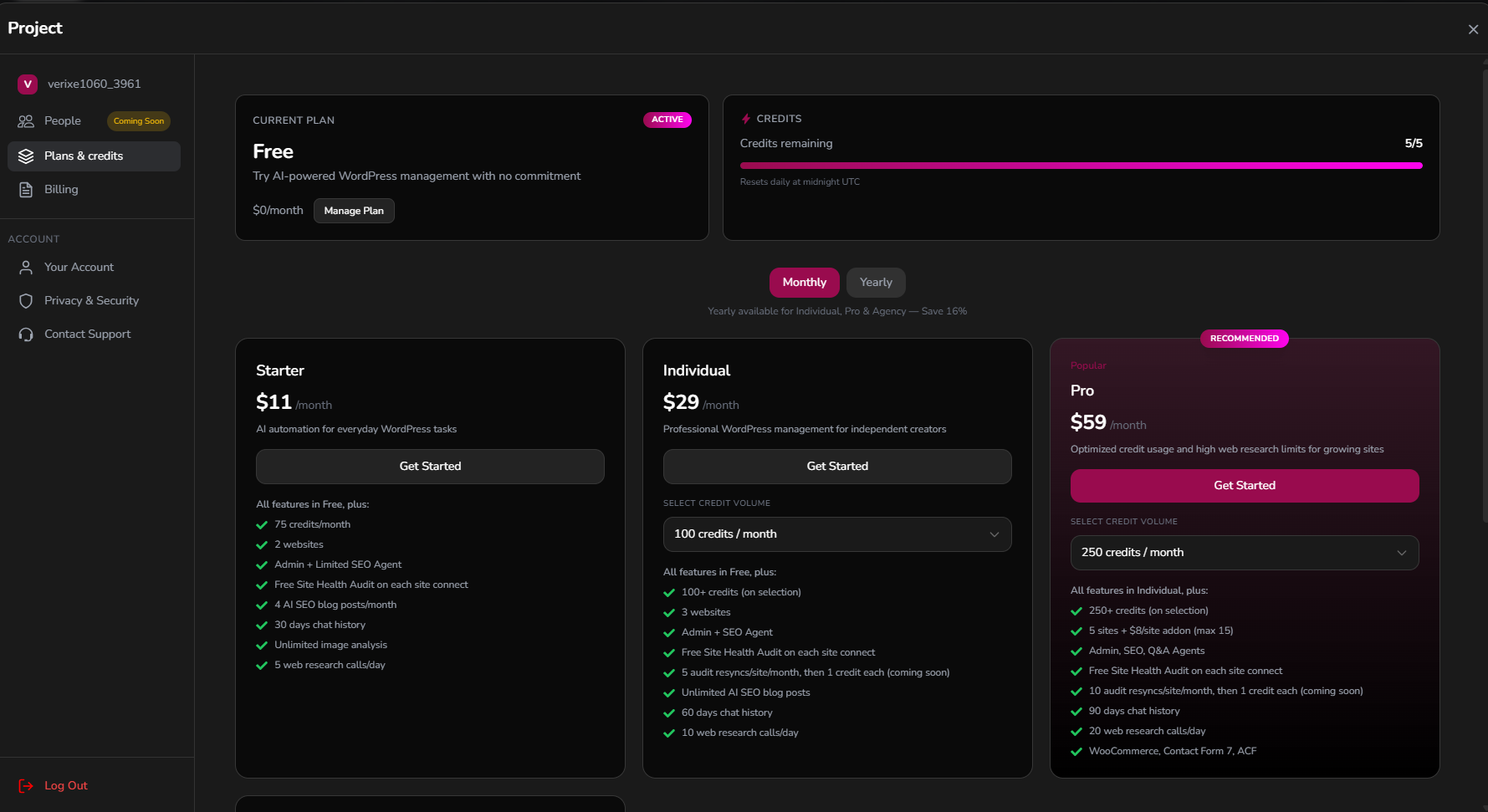
2. From Settings. Sign in, click your profile icon, click Settings, then in the side menu click Plans & Credits.
3. When you run out of free credits. If you've been using the Free plan and exhaust your daily credits, a "Time to upgrade" banner appears automatically. Click Upgrade on that banner and you'll jump straight to the plans modal.
Once you're in the upgrade flow
You'll see all available plans side by side. Then:
- Make sure the Monthly tab is selected (not Yearly).
WEBIVUSBETAonly works on Pro Monthly. - Click the Pro plan.
- Leave the credit tier on the default 250-credit option (the coupon is built for it).
- Click Continue to checkout (or the plan's CTA button).
- Webivus forwards you to the secure checkout page.
From here, follow Steps 5–7 from Path A above. Paste WEBIVUSBETA, watch the total drop to $0.00, add your card, subscribe.
Because you already have an account, you won't go through onboarding again. Pro just activates, and you can pick up where you left off.
How to confirm Pro is active
Whether you finished onboarding (Path A) or upgraded inside the app (Path B):
- Click your profile icon → Settings → Plans & Credits
- You should see "Current plan: Pro" with 250 credits available
- Pro-only features — the All Agents — should all be unlocked
If something looks off, wait 60 seconds and refresh. Billing webhooks occasionally take a moment to catch up. Still wrong after that? Ping us in Discord (below) with your account email and we'll sort it out.
What happens after the 30 days
On day 31, your card is charged $59 and your Pro benefits roll over for another month.
If Pro isn't right for you, cancel anytime from Settings → Billing before the renewal date. No questions, no retention call, no dark patterns. We'd rather you leave happy than stay annoyed.
You can also:
- Downgrade to Free, Starter, or Individual at any point
- Switch to yearly billing for a 16% discount once you decide Pro is your speed. The coupon discount only covers month 1 either way, so the timing doesn't matter
Troubleshooting
"The coupon says 'invalid' or 'not eligible'." The most common reason: Yearly is selected on the pricing page. WEBIVUSBETA only works on Pro Monthly. Go back, switch the Monthly / Yearly toggle to Monthly, and click Get started again.
"WEBIVUSBETA isn't applying at checkout." Check the spelling — all caps, no spaces, no leading or trailing whitespace. Some browsers paste invisible spaces from chat apps. If that doesn't fix it, ping us in Discord and we'll issue you a one-time replacement.
"I see the checkout page but no 'Have a coupon?' field." It's there, just collapsed as a small text link. Look just above the Total line. On mobile, it's near the bottom of the order summary.
"I subscribed but my dashboard still shows Free." Wait 60 seconds and refresh. If Pro still doesn't appear, log out and back in. If you're still stuck, contact us in Discord with your account email.
"I got stuck during the website-connect step of onboarding." You can skip it and connect later from Sites → Add Site. Your Pro plan is already active — the site connection isn't required to start using the agent. If the plugin install itself is failing, message us in Discord with your site URL and we'll walk you through it.
Come hang out in Discord
We're building Webivus in the open, and Discord is where the real conversation happens. Feature requests, bug reports, the occasional "anyone else's site doing X?" thread. The team is in there every day.
Join us: discord.gg/WC7kXHWYvN
Bring your WordPress questions, your wishlist, your hot takes. We read every message — and the roadmap genuinely shifts based on what beta users tell us.
Thanks for being early. Webivus is better because you're here.